 RollPoll
The guide · Section 3 of 15
Who can vote
Public polls and member polls, the texted code, and each member's own link.
Two kinds of poll
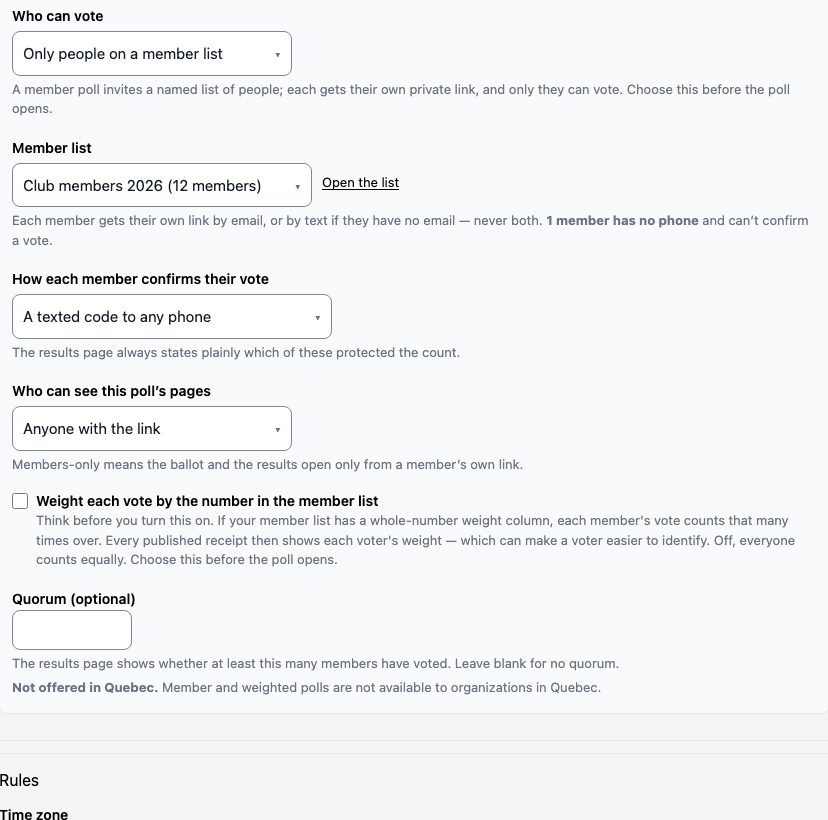
On the poll's screen, Who can vote has two answers:
- Anyone with the link — a public poll. Anyone who has the link or scans the QR code can vote, once per phone.
- Only people on a member list — a member poll. Only the people on your list can vote, each from their own private link.
Choose this before the poll opens. It has its own section on the poll's screen, under About your voters.
Public polls: one phone, one vote
In a public poll, each voter makes their pick, then confirms it with their mobile number. We text them a 6-digit code, and they type it in. That is how each person votes once. Their number is never shown to anyone and never stored.
Codes go to Canadian mobile numbers only for now. We send exactly one text per vote — never a reminder, never a follow-up.
Allow sharing online decides how people reach a public poll. On, the poll has a link and a QR code anyone can pass around. Off, it has neither, and people vote only by scanning one of your location signs. See Posters and signs.
Member polls
Choose Only people on a member list, then pick the list under Member list. If you don't have one yet, choose Create a new list…. Member lists tells you how to fill one.
Each member gets their own link, by email — or by text if they have no email. Never both.
How each member confirms their vote:
- A texted code to any phone — they confirm with a code texted to a phone, as in a public poll. Any phone will do.
- Their personal link (no phone) — the link alone is enough, and no code is texted.
- Their personal link + a texted code — they need both: their own link, and a texted code.
The results page always says which of these protected the count.
More choices for a member poll:
- Who can see this poll’s pages — Anyone with the link, or Members only. Members only means the ballot and the results open only from a member's own link.
- Weight each vote by the number in the member list — each member's vote counts as many times as the weight on the list. Think before you turn it on: every published receipt then shows each voter's weight.
- Quorum (optional) — the results page shows whether at least this many members have voted.
Member polls are not offered to organizations in Quebec.
Opening a member poll sends the invitations
Opening a member poll sends every member their invitation. So before it can open, you confirm, in the Member list panel, that you may contact these people. Type your full name and press Sign & enable invitations. Then open the poll with Open now, as with any poll.
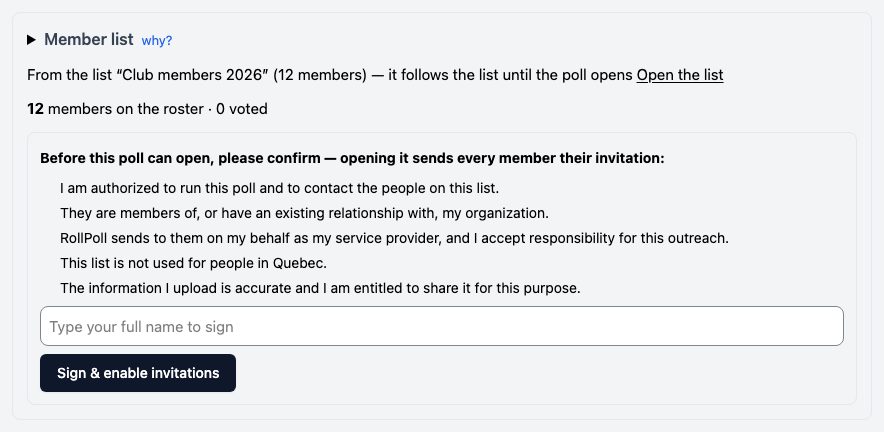
Until the poll opens, it follows the list: add someone to the list and they're on the poll. When it opens, the poll keeps its own copy. Member lists says how to add someone who was missed.
Still stuck? Signed in, use Contact RollPoll. Not signed in, Contact us.