 RollPoll
The guide · Section 2 of 15
Build a poll
Create poll, the poll's one screen — the title, the statement, the question, its choices and their attachments — the rules, the closing date, the vote limit, event mode, and opening it.
The poll's screen
On Your polls, press Create poll.
The poll's own screen opens at once. It says Edit poll at the top, and the poll is a draft from that moment: Draft shows under the title. Everything about the poll is on this one screen, from top to bottom:
-
Title — the line voters read at the top of the poll.
-
Statement (optional) — text voters read before the question: an introduction, an instruction, a note. It takes no answer, and it shows on the voting page and the results page. Press Add statement to add one.
-
Question — what people vote on, and how they vote:
- Single choice — voters pick one
- Multiple choice — voters can pick more than one
- Ranked — voters put the choices in order
Attach, on the question's row, adds one picture or PDF, shown at the top of the poll.
-
Choices — press Add choice for each one, or Bulk add to paste a list, one per line. Each choice's row has its own Attach, for a picture of that choice; the ✕ beside the choice deletes the choice. Once something is attached, its row shows it with Replace and Remove. The vote is always for the choice, never the picture. Tick Allow an “Other” free-text choice if people may write in their own answer. Preview (what a voter answers) shows the question the way a voter will see it.
-
About your voters — optional questions about the voters themselves. See Questions about your voters.
-
Who can vote — Anyone with the link, or Only people on a member list. See Who can vote.
-
Rules, Afterward, Share this poll, Locations and Poll ideas — below.
-
More settings — the poll's folder and its clock.
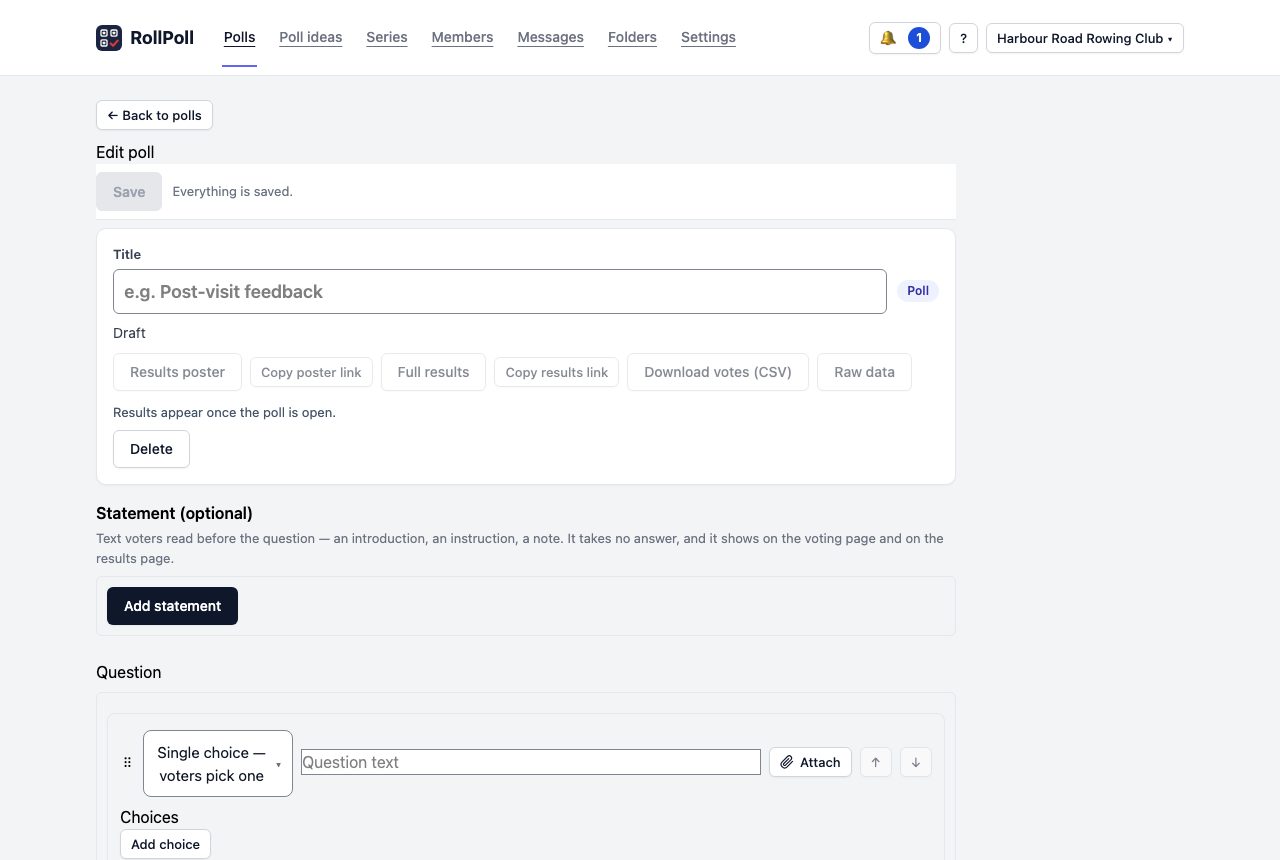
Press Save at the bottom, or the same button pinned at the top of the screen. One press saves everything on the screen. The page says Saved. beside the button. The poll is on Your polls, under Drafts, by its title.
A few things save the moment you change them: the switches in Rules, an attachment, a location. The things with a button of their own — Save times, Save webhook, a location's Save tags — work on their own too, and Save saves them as well.
If you leave the screen with changes you haven't saved, the browser asks Leave without saving? A new draft you leave with nothing in it is thrown away on its own, so it never sits on Drafts.
A poll has one question. If you need two questions, make two polls.
A button that can't do anything yet is greyed, with one line under it saying when it wakes. On a draft, Delete stands where Cancel poll stands: a draft is deleted, not cancelled.
| On a poll that is… | Greyed until… |
|---|---|
| a draft | Full results, Copy results link, Download votes (CSV) and Raw data: the poll is open. Open now: the poll has a title, a question and two choices. Create a scrutineer link: the poll is open. Results poster: the poll closes. |
| open | Results poster: the poll closes. |
| closed or cancelled | Nothing. |
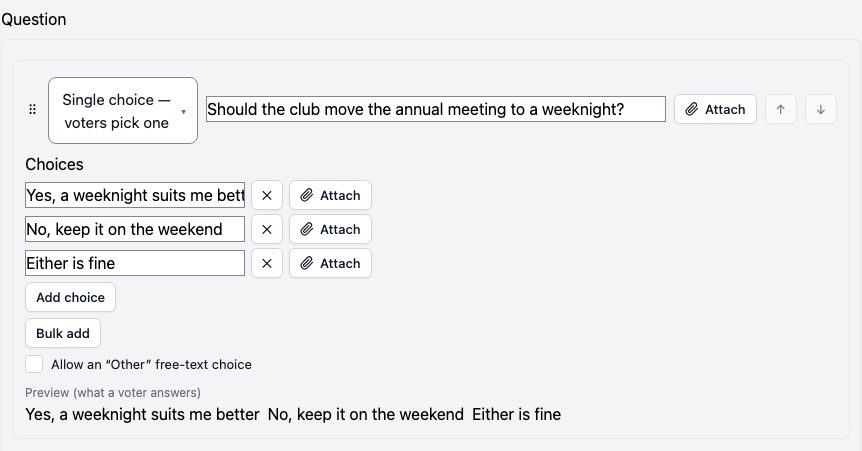
To come back to a poll, open it from Your polls. While it's a draft, you can change anything on it.
The rules
The Rules section sets how the poll runs.
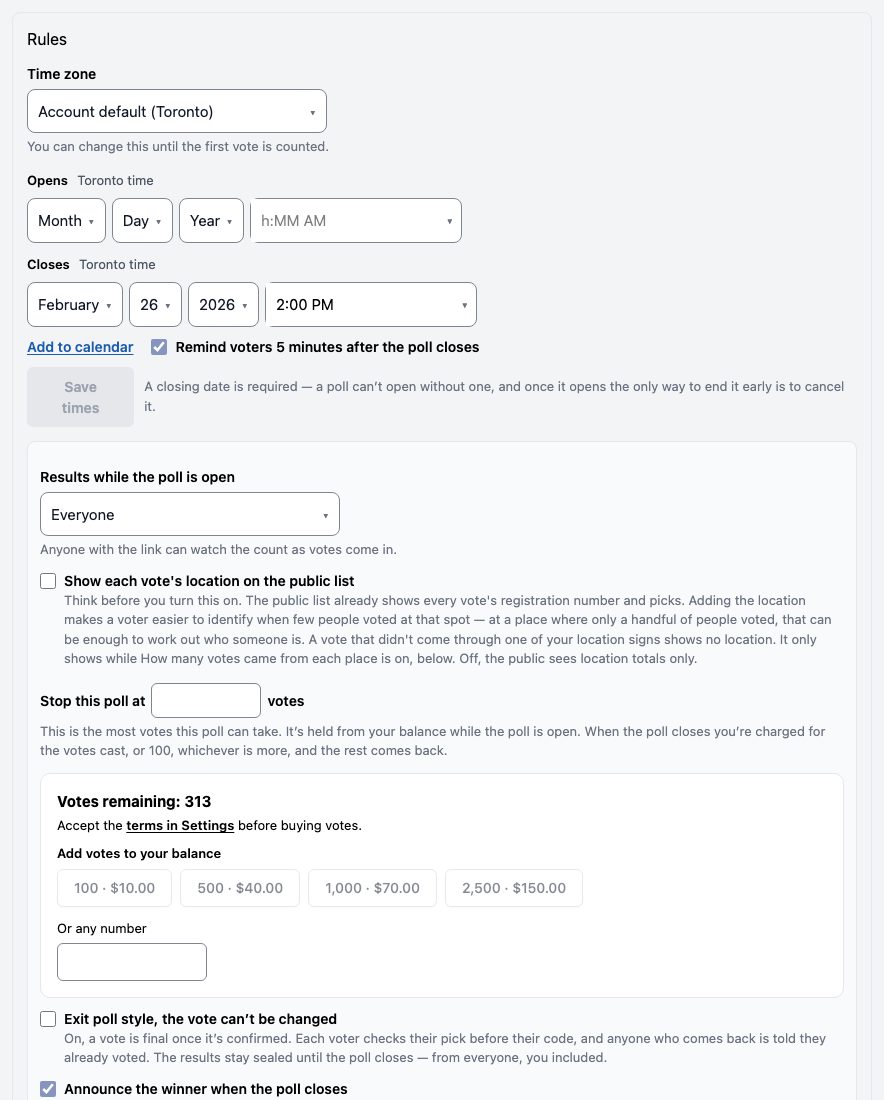
- Time zone — the time zone this poll's times are in. Account default uses your workspace's time zone, which you set in Settings. Or choose a city: Vancouver, Edmonton, Regina (no daylight-time shift), Winnipeg, Toronto, Halifax or St. John's. Every time the poll shows — on its pages, its results, its record and its emails — reads in that zone, with the city beside it. Your other polls keep their own. If you change it, the times you typed keep their clock reading: a 7:00 pm close stays 7:00 pm, in the new city. You can change it until the first vote is counted.
- Opens and Closes — the dates and times, then Save times. A poll can't open without a closing date. The city beside each says whose time it is.
- Add to calendar — under Closes, once a closing date is saved: a calendar event called Results: and the poll's question, at one moment with no length, 5 minutes after the closing time (8:05 to 8:05 for an 8:00 close), which opens this poll's screen. Its reminder is at that moment. It opens in Apple, Google and Outlook calendars. The event says when the poll closed and that the results are ready, and that the closing time is as it was set when you saved it. Your voters get the same link on Your vote is in, with the results link and their registration number in it. RollPoll keeps nothing about these events and sends nothing for them: the reminder is the calendar's own.
- Remind voters 5 minutes after the poll closes — beside Add to calendar, on unless you turn it off. On, the voters' events, and yours, are 5 minutes after the closing time, to give the About the voters breakdowns time to be worked out. Off, they are at the closing time, and the screen says so: Off: voters are reminded at the closing time, when the About the voters breakdowns may not be completed yet. An event already saved keeps the time it was saved with.
- Results while the poll is open — Everyone can watch the count as votes come in, or Only people who have voted, or Nobody until it closes. Nobody includes you: until the poll closes you see how many votes are in, but no picks and no count for any choice — not in Raw data, the download, a scrutineer link or anywhere else. Your voters are told so on the ballot, in their texts and invitations, and on your signs. Closing is the only way the votes are ever seen: if you cancel the poll before it closes, its votes are deleted unseen — nobody, you included, ever sees them. On such a poll the closing date wins over the vote limit: reaching the limit ends the voting, and the results still open only at the closing date. Until then a voter who arrives sees Voting has ended. The results open … with the closing date, and your poll's screen says Voting ended — results open ….
- Stop this poll at — the vote limit. It's the most votes this poll can take. On most polls, reaching it closes the poll. On a poll set to Nobody until it closes, reaching it ends the voting only, and the screen says so under the box: Reaching this limit ends the voting. The poll stays sealed until its closing date, and the results open then, not before. The number is held from your balance while the poll is open. Votes remaining shows your balance right under it, with the bundles to add more.
- Exit poll style, the vote can’t be changed — each vote is final once it’s confirmed. See Exit polls below. You can change it until the first vote is counted.
- Announce the winner when the poll closes — the results page names the winner in a banner. A tie says so; it never picks one.
- This is a political poll — for a community or policy question. It adds “Not a scientific sample” to every screen the poll appears on.
- Event mode — many voters, one wi-fi — turn this on when voters are together in one hall, arena or venue, where many phones share one internet connection. Each phone still gets one vote.
- How often the results update — New votes are added in batches, so nobody can tell when someone voted. A longer gap hides voters better. On an exit poll, results stay hidden until it closes. You can't change this after the first vote.
- What the results page shows — tick what the public sees: the bars, when people voted, the votes from each place, and the file to download.
Exit polls
Turn on Exit poll style, the vote can’t be changed in Rules for a poll where each person votes once and that's final. While it's on, Results while the poll is open is held at Nobody until it closes and greyed: Exit polls keep results sealed until the closing date. So everything above about Nobody until it closes holds for an exit poll too — including that cancelling it deletes its votes unseen.
What changes for your voters:
- The voting page says, above the choices: Votes are final in this poll — once your vote is confirmed, it can't be changed.
- After they press Continue, they see their pick on Check your vote, with This vote is final — it can't be changed once it's confirmed. They can press Change my pick to go back, or Continue to go on to their phone.
- Someone who comes back gets everything as before, up to and including their code. After the code they're told: You've already voted in this poll. Votes in this poll can't be changed. Your registration number is and their number. Their vote stays exactly as it was first cast. Nothing is recorded about their coming back, and nobody — you included — sees a count of it.
- On a member poll with personal links, a member who has voted and opens their link again is told so at once.
Once the first vote is counted, the setting is fixed: Locked — a vote has been counted, so this can't change now. In a series, set it on the series: every round carries it.
Afterward
The Afterward section is for when the poll is running and after it closes:
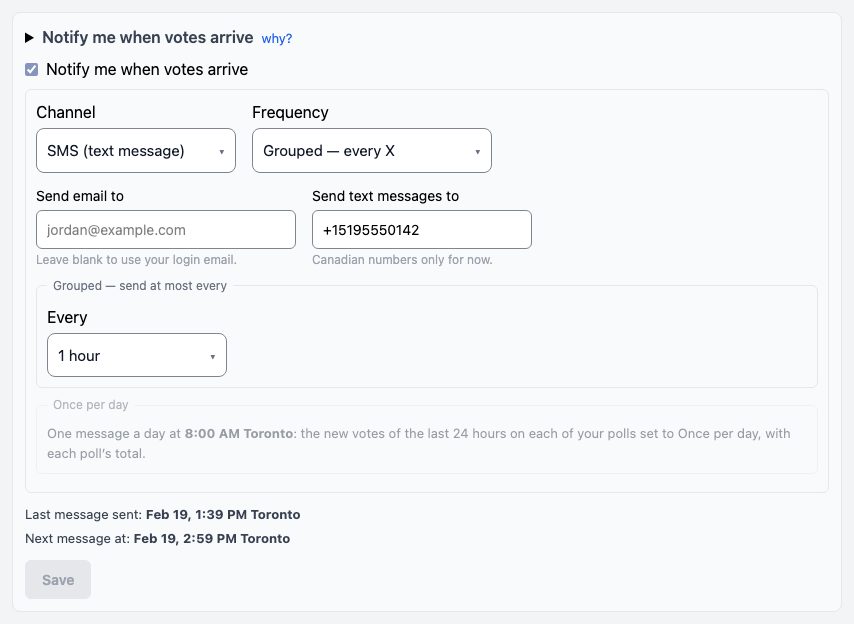
- Notify me when votes arrive — a message to you, by email or text, when people vote. Real-time sends one for each new vote. Grouped gathers them: one message, the chosen time after the first new vote, saying how many came in; no votes, no message. Once per day sends one message a day, at the hour the panel names (in the poll's own time zone): the new votes of the last 24 hours on each poll set to it, and each poll's total. A text goes to the number under Send text messages to. With no number there, text can't be switched on, and the screen says so in red. Each message names the poll and how many votes it has, and a text ends Reply STOP to opt out. Messages start from the next vote after you switch it on.
- Send the result somewhere when the poll closes (optional) — for a website of your own that wants the result the moment the poll closes. Most organizers leave it empty.
More settings, near the bottom, holds the poll's folder and its Clock format: 12-hour (7:00 PM) or 24-hour (19:00). Every time the poll prints follows it — the voting page, the sign, the invitations, the results and the record, Messages, Raw data and the notification lines. Account default uses the clock chosen in Settings.
Once it's on and saved, two lines under it show it working, in the poll's own time zone: Last message sent (or none yet), and, when grouped, Next message at — the time the next message goes, or none waiting until someone votes.
Send the result somewhere when the poll closes
This is for a website or tool of your own that should get the result by itself the moment the poll closes: a club site, a spreadsheet tool, a chat channel. Most organizers leave it empty, and then nothing is sent.
In Afterward, under Send the result somewhere when the poll closes (optional), paste the address your tool gave you into Webhook address. It starts with https:// and is 255 characters at most. In Signing secret, type a password of your own that your tool also knows. Press Save webhook. The secret is never shown again, on any screen; the box then says one is set — type to replace it. You can change both until the poll closes.
What is sent, and when. When the poll closes, RollPoll sends one message to that address, within a minute. A poll closes at its closing time or on reaching its vote limit, except a poll set to Nobody until it closes: reaching the limit ends its voting, and it closes at its closing time. A cancelled poll sends nothing: it has no result. The message is a web request (a POST) carrying, as JSON:
event: alwayspoll.closed;poll_idandtitle: which poll;counted: how many votes were counted (on a weighted member poll, the weight's total, withvotersbeside it);record_code: the 12-character code on the results page and the record, andchecksum, the record's whole fingerprint;final_url,manifest_url,csv_url,poster_url: the final results page, the record, the votes as a spreadsheet file, and the results poster.
If the address doesn't answer, RollPoll tries again 15 seconds later, then a minute after that: three tries in all, then it stops. Your poll closes on time either way, and its results are always at the links on its screen. A try counts as failed when the address takes more than 10 seconds to answer, even if it got the message, so a slow tool can get the same message up to three times: each copy has the same poll_id and record_code, so your tool can keep the first and ignore the rest.
How it's signed. With every message comes a line X-Poll-Signature, reading sha256= and then 64 letters and numbers. They are made from the message's exact words and your secret (HMAC-SHA256). Only someone who knows the secret can make them, so your tool can tell the message came from RollPoll and wasn't changed on the way.
How your tool checks it, in three steps:
- Take the message's body exactly as it arrived, before reading it as JSON.
- Work out HMAC-SHA256 of that body with your secret, written as hex.
- Put
sha256=in front. If it matches theX-Poll-Signatureline exactly, the message is real. If not, ignore it.
A worked example. A poll set with the secret club-secret-2026 closes with 38 votes, and this body arrives:
{"event":"poll.closed","poll_id":4021,"title":"Club night","counted":38,"checksum":"5f2c9a41d07e8b3366e0f9a2c4d1b7e85a90c3f6d2e14b7a8c5d6e9f0a1b2c3d","record_code":"5f2c9a41d07e","final_url":"https://rollpoll.ca/r/k3v9qx2m/final","manifest_url":"https://rollpoll.ca/r/k3v9qx2m/manifest.json","csv_url":"https://rollpoll.ca/r/k3v9qx2m/data.csv","poster_url":"https://rollpoll.ca/r/k3v9qx2m/poster"}
with X-Poll-Signature: sha256=8126b58a3df69753b0e996c69bb244a343bf201fca4658e2927a3f65526dbf74. On a Mac, save the body in a file named body.json and type in Terminal:
openssl dgst -sha256 -hmac 'club-secret-2026' < body.json
It prints 8126b58a3df69753b0e996c69bb244a343bf201fca4658e2927a3f65526dbf74: the same, so this message is real. In PHP, a website checks it with:
$body = file_get_contents('php://input');
$expected = 'sha256=' . hash_hmac('sha256', $body, 'club-secret-2026');
$real = hash_equals($expected, $_SERVER['HTTP_X_POLL_SIGNATURE'] ?? '');
After the poll closes, its screen says what happened, under Afterward: Sent to the address at the time it got through, in the poll's own time zone; or Couldn't reach the address after 3 tries, with why the last try failed (the address answered with an error, didn't answer within 10 seconds, or nothing answered there). While the tries are still going it says Sending to the address; reload the page to see how it went. On a cancelled poll it says nothing was sent.
Open the poll
When the poll is ready, go to the bottom of its screen and press Open now. It saves anything you haven't saved first. A box asks Open this poll now?. Press Open now in the box. The poll is now open, and people can vote.
Or leave it closed and set Opens: it opens by itself at that time.
Once the first vote is verified, the poll's wording, its choices and its closing date lock and can't be changed. That is what lets anyone check the count.
Ending a poll
A poll closes by itself at its closing date, or when it reaches its vote limit. On a poll set to Nobody until it closes, reaching the limit ends the voting, and the poll closes at its closing date. The only way to end it early is Cancel poll. A box asks Cancel this poll?. Press Cancel poll to cancel it, or Keep the poll open to leave it running. A cancelled poll shows as VOIDED, with no winner and no result. It can't be undone. On a poll set to Nobody until it closes, the box also says Its votes will be deleted unseen — nobody, you included, will ever see them. — and they are: the votes, the answers about voters and the record's entries are deleted the moment you press Cancel poll. You're still charged for the votes cast, as on any cancel.
Change a poll that's open
Once a vote is counted, the title, the question, the choices, the closing date and the vote limit are fixed. The screen says Locked — a vote has been counted beside each one.
If a choice should not be on the poll, press Withdraw beside it. It stays on the poll page, greyed and marked withdrawn, and nobody new can vote for it. The votes already cast for it still count. Put back undoes it.
Still stuck? Signed in, use Contact RollPoll. Not signed in, Contact us.